💫
TypeScript - 열거형(Enum)과 리터럴 타입 (Literal)
May 06, 2023

interface Student {
  readonly studentID: number;
  studentName: string;
  age: number;
  gender: string;
  subject: string;
  courseCompleted?: boolean;
  addComment?(comment: string): string;
}
인터페이스 내에 gender 프로퍼티의 값이 string 으로 되어 있는데, 이 값을 male or female 두가지로만 제한 하고 싶다면 단순히 property 타입을 string 으로 명시하는 것 말고 조금 더 나은 방법으로 크게 두가지 방법이 있다.
1. 열거형 (Enum)
Enum 이란 연관된 아이템들을 함께 묶어서 표현 할 수 있는 수단
Enum 을 사용하기 위해서는 먼저 Enum 을 선언 해야 하는데 사용하기 위해서 Enum 키워드를 넣어주고 이름을 지어준다.
그리고 선택지로 쓸 수 있는 값을 Enum 속에 넣어 준다.
enum GenderType {
  Male,
  Female,
}

interface Student {
  readonly studentID: number;
  studentName: string;
  age: number;
  gender: GenderType;
  subject: string;
  courseCompeted?: boolean;
  addComment?(comment: string): string;
  // addComment( comment: string) => string
}
선언된 enum 을 타입으로 쓰기 위해 인터페이스 의 젠터 프로퍼티의 타입을 string 이 아닌 이넘의 이름인 GenderType 으로 바꾸어 준다.
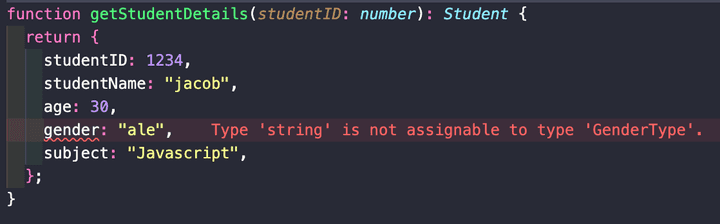
그 이후 함수에서 에러가 생기는데 확인을 해보면 타입이 gendertype 이 아닌 string이라는 에러가 생기는 것을 볼 수 있다.
 function getStudentDetails ( studentID: number): Student {
  return {
    studentID: 1234,
    studentName: "jacob",
    age: 30,
    gender: GenderType.Male,
    subject: "JavaScript",
  };
 }
기존 string 이었던 value 를 선언한 enum 인 GenderType 을 입력하고 .Male 로 바꿔 주면 된다.
⚠️ 여기서 짚고 넘어가야 할것은 컴파일 된 자바스크립트 코드를 확인 하면 컴파일시 사라지는 interface 와는 달리 enum 은 코드가 구현이 되어 자바스크립트 파일에 나타나게 된다 이것은 eunum 이 런타임에 존재하는 실제 객체라는 것을 보여준다.
var GenderType;
(function (GenderType){
    GenderType[GenderType["Male"]= 0 ]= "Male";
    GenderType[GenderType["Female"]= 1]= "Female";
})(GenderType || (GenderType = {}));
컴파일된 자바스크립트 를 보면 Male 에는 숫자 0 그리고
Female 에는 숫자 1 이 나타나는데 이건 타입스크립트가 enum 속에 선언된 값의 순서에 따라 0 부터 시작해서 순차적으로 증가하는 숫자를 할당 한것이다.
즉, 코드에 뜻은 enum 속에 아이템 첫번째는 0 의 값을 가지고 두번째는 1의 값을 가지며 순차적으로 숫자가 커진다 라는 것이다.
이것이 바로 타입스크립트 에서 숫자 열거형 Numeric Enum 이라는 것이다.
만약 enum 속에 값의 value 가 숫자가 아니라 문자열 을 갖길 원한다면 String Enum 을 만들 수 있다.
타입스크립트에서는 문자열 열거형인 String Enum 을 허용한다.
numeric 에서 string 으로 바꾸는 것은 간단하다.
이넌 속에 멤버 들에게 각각의 값을 할당해 주기만 하면 된다.
👇 TypeScript
enum GenderType {
  Male= "male",
  Female= "female",
}
👇 JavaScript
var GenderType;
( function (GenderType){
    GenderType['Male']= 'male';
    GenderType['Female']= 'female';
})(GenderType || (GenderType ={}));
String Enum 은 Numeric Enum 처럼 자동 증가하는 기능은 없지만 코드를 실행할 때 조금 더 읽기 쉬운 값을 주는 장점이 있다.
2. 리터럴 타입 (Literal)
리터럴 타입은 이넘 타입 보다 조금 더 쉽다.
interface Student {
  readonly studentID: number;
  studentName: string;
  age: number;
  gender: "male" | "female";
  subject: string;
  courseCompleted?: boolean;
  addComment?(comment: string): string;
  // addComment( comment: string ) => string
}
선언된 이넘 타입이 적용되었던 기존 부분에 string 형인 male 과 female 을 입력해준다 단 중요한건 사이에 | 파이프 라인을 넣어주기만 하면 끝이다.
function getStudentDetails(studentID: number): Student{
  return{
    studentID: 1234,
    studentName: "jacob",
    age: 30,
    gender: "male",
    subject: "JavaScript",
  };
}

function saveStudentDetails(student:Student): void{}

saveStudentDetails({
  studentID: 12341234,
  studentName: "jason",
  age:20,
  gender: "female",
  subject: "Java",
});
그리고 함수 gender 부분에 male 과 female 을 각각 기입해주기만 하면 된다.